A CSS rule is like a set of instructions that tells your browser how to style a specific HTML element or group of elements. It consists of two main parts:
- Selector: This is the part that identifies the HTML element(s) you want to style. It can be as simple as a tag name (like
h1for headings) or more complex, using classes, IDs, or attributes. - Declaration Block: This is where you define the specific styles you want to apply to the selected elements. It’s enclosed in curly braces
{}and contains one or more declarations.
Example
h1 {
    color: blue;
    font-size: 24px;
    text-align: center;
}
In this example:
- Selector:
h1targets all<h1>elements on the page. - Declaration Block:
color: blue;sets the text color to blue.font-size: 24px;sets the font size to 24 pixels.text-align: center;centers the text horizontally.
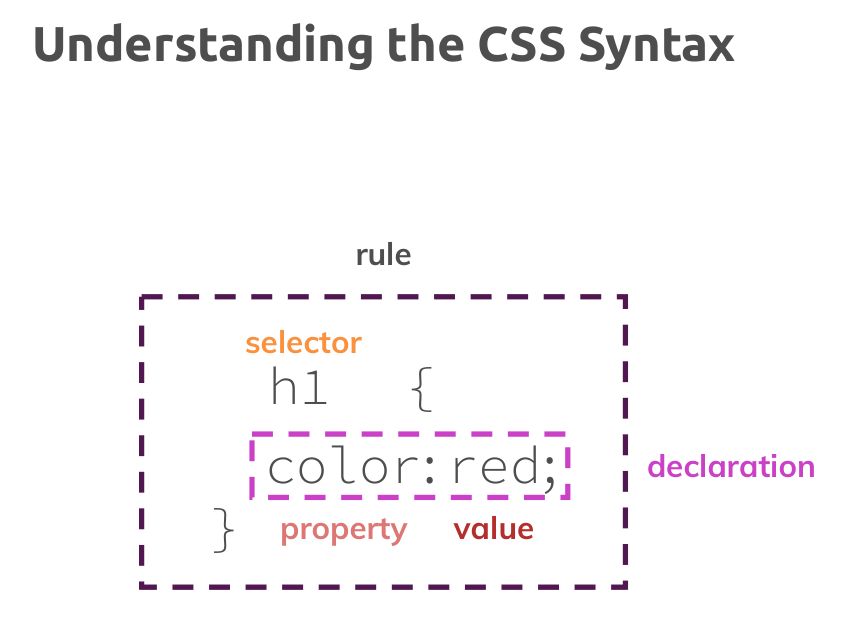
How CSS Rules Work
When a browser loads an HTML page with linked CSS stylesheets, it applies the rules to the matching elements. The browser follows a specific order of precedence to determine which styles take effect when multiple rules target the same element.